Last night there was a bug in Android Market server that caused "Download Error" for people who downloaded version 13.4 of NubiNews. In most cases, if you just download the latest version (13.5 of this writing), you will be able to upgrade successfully.
However, in the worst case (it actually happened to me during testing), your Android Market app will be stuck in a state where it keeps saying "failed to download" NubiNews.
The only solution is go to Settings -> Applications -> Manage Applications. Choose "Android Market". The Choose "Clear Data" and "Clear Cache".
This is a bug in the Android Market server. I am sad to say I had nothing to do with this and can't do anything about it.
If you have problems, please write to nubinews@gmail.com.
Saturday, September 4, 2010

Saturday, August 14, 2010
新版离线下载使用说明
大牛新闻12.9版起增强了定时下载功能,可以让你把常看的新闻频道都定时复制到手机里,你在任何地方,就算没有网络,都可以看到你要看的新闻。
首先浏览到你要下载的频道,点击右上角的下载图标

第一次使用下载功能时,你会得到自动提示,请你设置离线阅读的选项。这里你可以选“预设配置”来设定每次下载的流量(也可以每一项自己慢慢去设定)
另外,要是你的2G/3G服务不是无限流量的话,请不要选择“用2G/3G网络下载”的选项,否则你会为你当地的无良运营商带来一笔可观的收入。

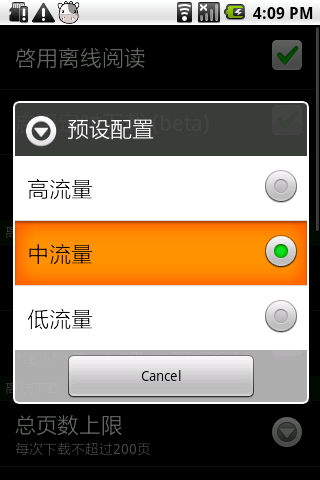
请选择“启用背景下载服务” -- 这样可以保证在离线下载的时候,你还可以继续用大牛新闻阅读线上的新闻

设置完成之后,就可以下载了。在对话窗口里可以选择下载页数:

点击“确认”后,下载会开始。要是你这时想继续用阅读线上的新闻,请按“后台下载”

下载的时候,“大牛新闻正在离线下载”的图标会出现在系统状态条上。把状态条往下拉,再点击大牛的图标就可以检查下载的状态。

下载完毕后,系统状态条上的大牛图标会变成“离线下载完成”。把状态条往下拉,再点击大牛的图标就可以显示你已经下载的所有新闻:

你已经下载的所有新闻:

在已下载的新闻标题旁边会出现灰色的页面图标(见下图左上角):


定时下载功能
大牛新闻的定时下载功能,可以让你把常看的新闻频道都定时复制到手机里,你在任何地方,就算没有网络,都可以看到你要看的新闻。
定时下载还有一个好处是显示速度极快 -- 已下载的新闻,就算有多个图片,在一两秒以内就可以完全打开,比在PC上读新闻还要快,所以大牛新闻作者他本人已经很久没用PC读新闻了。
这里晒一晒作者手机里已下载的新闻,我设置的储存上限是80MB,在家里和公司里都有WiFi,每个频道设定在半小时一次,经过一段时间使用后,每个频道都下载了几十到数百条新闻,要看一天也看不完!

闲话休提,这里解释定时下载的用法
首先浏览到你要定时下载的频道,点击右上角的下载图标

在对话窗口点击“定时下载”

在下一个对话窗口点击“...”的按键

这里可以选择周期性的下载


或者在指定时间下载(比如设定在早上出门前把最新的新闻下载到手机里)


所有定时下载的频道都会出现在你的书签里,要是你需要编辑定时下载的时间,请点击菜单里的“书签”选项

再点击书签右边的齿轮图标就可以更新定时下载的设定。

就是这样咯!
Saturday, February 20, 2010
Friday, February 12, 2010
Apparently people really like the cow
OK, some users hate it, but recently we get a flurry of petitions to keep the cow.
So, the cow stays ....

So, the cow stays ....

Tuesday, January 26, 2010
Pre-announce NubiNews.net
NubiNews.net is the next generation of NubiNews.
The ".net" here means we will support "Community Sources" -- anyone can publish "enhancement scripts" for displaying their favorite web sites in the streamlined NubiNews style. This is very similar to greasemonkey, which has a large number of scripts available from http://userscripts.org/. So hopefully instead of the 50 or so web sites that NubiNews 7.x used to support, we will soon see hundreds of web sites ....
Also, NubiNews.net will no longer bundle a large number of enhancement scripts. This will allow the NubiNews author concentrate on their favorite tasks, such as improving the offline reading capabilities.
The ".net" here means we will support "Community Sources" -- anyone can publish "enhancement scripts" for displaying their favorite web sites in the streamlined NubiNews style. This is very similar to greasemonkey, which has a large number of scripts available from http://userscripts.org/. So hopefully instead of the 50 or so web sites that NubiNews 7.x used to support, we will soon see hundreds of web sites ....
Also, NubiNews.net will no longer bundle a large number of enhancement scripts. This will allow the NubiNews author concentrate on their favorite tasks, such as improving the offline reading capabilities.
Thursday, January 21, 2010
People wake up
Here's a response to the "NubiNews falls victim to political pressure" comments in Android Market.
Not everything is about politics. We stopped distributing HK/Taiwan/US news because an HK publisher threatened to sue us. We have too little money and too little time to fight them in court.
Most non-mainland-China sites were already blocked by the Chinese firewall. There was no point for the Chinese government to take on NubiNews, as NubiNews does not have any firewall-breaking capability. Plus, NubiNews developers all live outside of China so we don't really care what the Chinese government thinks.
So here it goes. If you need to find someone to hate in this incident, pick the lawyers.
It's time to stop being too simple, sometimes naive.
P.S., we are working on a solution to separate (a) NubiNews the reader app, and (b) the contents. This will allow 3rd party developers to post their favorite sites onto NubiNews. Hopefully this will be done in a few weeks. In the mean time, please be patient and feel free to explore other wonderful readers out there :-)
Not everything is about politics. We stopped distributing HK/Taiwan/US news because an HK publisher threatened to sue us. We have too little money and too little time to fight them in court.
Most non-mainland-China sites were already blocked by the Chinese firewall. There was no point for the Chinese government to take on NubiNews, as NubiNews does not have any firewall-breaking capability. Plus, NubiNews developers all live outside of China so we don't really care what the Chinese government thinks.
So here it goes. If you need to find someone to hate in this incident, pick the lawyers.
It's time to stop being too simple, sometimes naive.
P.S., we are working on a solution to separate (a) NubiNews the reader app, and (b) the contents. This will allow 3rd party developers to post their favorite sites onto NubiNews. Hopefully this will be done in a few weeks. In the mean time, please be patient and feel free to explore other wonderful readers out there :-)
Sunday, January 17, 2010
关于繁体与英语网站
其实这件事跟ZF的某些政策完全无关,而是版权的问题:
大牛新闻本身并没有任何服务器,所有内容都是直接从新闻网站下载到用户的手机,然后通过手机本地的JavaScript把HTML简化再显示。这种做法跟桌面电脑常用的GreaseMonkey是同一原理。
我们相信大牛新闻这种做法完全没有违反中国内地的任何法规,因为大牛新闻提供的只是JavaScript,而没有提供或转载任何新闻的内容。
可是我们对境外的法规不了解,并在最近遭到一些境外新闻供应商的干扰,在有充分法律意见之前,一切在版权方面有疑问的网站一律取消提供JavaScript。很不幸所有的繁体与英语网站都在此列。(还有一个简体的受害者是Engadget)
问题就是如此,希望大家不要对号入座,与最近发生的乱七八糟事件做过多的联想。
如有xd能提供境外法律援助(含港台美),请发mail到nubinews@gmail.com。谢谢!
大牛新闻本身并没有任何服务器,所有内容都是直接从新闻网站下载到用户的手机,然后通过手机本地的JavaScript把HTML简化再显示。这种做法跟桌面电脑常用的GreaseMonkey是同一原理。
我们相信大牛新闻这种做法完全没有违反中国内地的任何法规,因为大牛新闻提供的只是JavaScript,而没有提供或转载任何新闻的内容。
可是我们对境外的法规不了解,并在最近遭到一些境外新闻供应商的干扰,在有充分法律意见之前,一切在版权方面有疑问的网站一律取消提供JavaScript。很不幸所有的繁体与英语网站都在此列。(还有一个简体的受害者是Engadget)
问题就是如此,希望大家不要对号入座,与最近发生的乱七八糟事件做过多的联想。
如有xd能提供境外法律援助(含港台美),请发mail到nubinews@gmail.com。谢谢!
Wednesday, January 6, 2010
Help us diagnose problems
If you see a weird problem with NubiNews, you can help us diagnose the problem by sending us the "Log File".
Thanks!
中文:可以在Android Market安装一个叫SendLog的程序,然后跑大牛新闻,问题出现之后启动SendLog,点“Send”,发送到我们的邮箱 nubinews@gmail.com
谢谢
- Install an application called SendLog from the Android Market.
- Start NubiNews. Proceed until your problem occurs.
- Go back to the Home Screem and launch SendLog.
- Tap on the "Send" button
- Choose e-mail address nubinews@gmail.com
Thanks!
中文:可以在Android Market安装一个叫SendLog的程序,然后跑大牛新闻,问题出现之后启动SendLog,点“Send”,发送到我们的邮箱 nubinews@gmail.com
谢谢
Sunday, January 3, 2010
More todo items
For better organization, the bugs/feature/todo list is moved to the google.code web site:
http://code.google.com/p/nubi/issues/list
Please file or vote for your favorite bugs!
http://code.google.com/p/nubi/issues/list
Please file or vote for your favorite bugs!
Monday, December 28, 2009
Yes, you can run JavaScript inside a Service
Contrary to what I heard from the android-developers group, you can actually create a WebView inside an Android Service, and use it to run JavaScript. JavaScript is needed by NubiNews in processing the HTML data downloaded from the news web sites.
This means, finally, I can implement offline syncing inside a Service. It will probably take a month from this point ....
In my test, this code is added to a Service's onCreate function:
Object o = new Object() {
public void trace(String s) {
System.out.println("JavaScript: " + s);
}
};
public void onCreate() {
WebView webView = new WebView(this);
WebSettings webSettings = webView.getSettings();
webSettings.setSavePassword(false);
webSettings.setSaveFormData(false);
webSettings.setJavaScriptEnabled(true);
webSettings.setSupportZoom(false);
webView.addJavascriptInterface(o, "backdoor");
webView.loadData("<" + "script language="\">window.backdoor.trace('I AM HERE');<" + "/script>", "text/html", "utf-8");
and, I see this "proof of life" output from logcat:
I/System.out(10440): JavaScript: I AM HERE
This means, finally, I can implement offline syncing inside a Service. It will probably take a month from this point ....
In my test, this code is added to a Service's onCreate function:
Object o = new Object() {
public void trace(String s) {
System.out.println("JavaScript: " + s);
}
};
public void onCreate() {
WebView webView = new WebView(this);
WebSettings webSettings = webView.getSettings();
webSettings.setSavePassword(false);
webSettings.setSaveFormData(false);
webSettings.setJavaScriptEnabled(true);
webSettings.setSupportZoom(false);
webView.addJavascriptInterface(o, "backdoor");
webView.loadData("<" + "script language="\">window.backdoor.trace('I AM HERE');<" + "/script>", "text/html", "utf-8");
and, I see this "proof of life" output from logcat:
I/System.out(10440): JavaScript: I AM HERE
Sunday, November 15, 2009
Smooth full screen transition
I finally found out how to smoothly transition to and from Android's full-screen mode. I wanted the status bar to be displayed most of the time, but switched off when the user views an image.
To create the main screen:
setContentView(mGLView);
addContentView(mTopView);
WindowManager.LayoutParams attrs = getWindow().getAttributes();
attrs.flags |= WindowManager.LayoutParams.FLAG_LAYOUT_IN_SCREEN | WindowManager.LayoutParams.FLAG_LAYOUT_NO_LIMITS;
getWindow().setAttributes(attrs);
mTopView.setPadding(0, 25, 0, 0);
mTopView is a FrameLayout at the top of my window hierarchy. 25 is the height of the status bar.
mGLView is a GLSurfaceView that I use to display the image. Note that at this point, the size of both mTopView and mGLView will fill the entire screen (but be clipped by the status bar at the top edge).
The setPadding() call offsets the child of mTopView so that the child appears just beneath the status bar.
To switch to full screen mode, call this
WindowManager.LayoutParams attrs = getWindow().getAttributes();
attrs.flags |= WindowManager.LayoutParams.FLAG_FULLSCREEN;
getWindow().setAttributes(attrs);
change_my_layout();
The above code will essentially hide the status bar and give you an extra 25 pixels at the top of the screen. In change_my_layout(), I do this:
mTopView.setVisibility(View.GONE);
mGLView.setVisibility(View.VISIBLE);
The key here is to use FLAG_LAYOUT_IN_SCREEN | FLAG_LAYOUT_NO_LIMITS. Otherwise the screen will "jerk" a little bit when you apply FLAG_FULLSCREEN.
Also note that mGLView must be positioned behind mTopView in the view stack. Otherwise the mGLView will not be visible to the user EVEN IF the mTopView is set to View.GONE (due to interesting design in Android that's too much to explain here ....).
Failed Attempts:
I tried the "True Android Way" but creating a new full-screen Activity to hold the mGLView. However, this proved to be too slow (at least 500ms on the G1).
To create the main screen:
setContentView(mGLView);
addContentView(mTopView);
WindowManager.LayoutParams attrs = getWindow().getAttributes();
attrs.flags |= WindowManager.LayoutParams.FLAG_LAYOUT_IN_SCREEN | WindowManager.LayoutParams.FLAG_LAYOUT_NO_LIMITS;
getWindow().setAttributes(attrs);
mTopView.setPadding(0, 25, 0, 0);
mTopView is a FrameLayout at the top of my window hierarchy. 25 is the height of the status bar.
mGLView is a GLSurfaceView that I use to display the image. Note that at this point, the size of both mTopView and mGLView will fill the entire screen (but be clipped by the status bar at the top edge).
The setPadding() call offsets the child of mTopView so that the child appears just beneath the status bar.
To switch to full screen mode, call this
WindowManager.LayoutParams attrs = getWindow().getAttributes();
attrs.flags |= WindowManager.LayoutParams.FLAG_FULLSCREEN;
getWindow().setAttributes(attrs);
change_my_layout();
The above code will essentially hide the status bar and give you an extra 25 pixels at the top of the screen. In change_my_layout(), I do this:
mTopView.setVisibility(View.GONE);
mGLView.setVisibility(View.VISIBLE);
The key here is to use FLAG_LAYOUT_IN_SCREEN | FLAG_LAYOUT_NO_LIMITS. Otherwise the screen will "jerk" a little bit when you apply FLAG_FULLSCREEN.
Also note that mGLView must be positioned behind mTopView in the view stack. Otherwise the mGLView will not be visible to the user EVEN IF the mTopView is set to View.GONE (due to interesting design in Android that's too much to explain here ....).
Failed Attempts:
I tried the "True Android Way" but creating a new full-screen Activity to hold the mGLView. However, this proved to be too slow (at least 500ms on the G1).
Saturday, October 17, 2009
Mojibake
I finally found out why some Japanese pages have corrupted encoding when displayed in NubiNews. This happened very often when I test on slow 3G network, but happened rather rarely on WiFi.
The reason is this code:
encoding = "EUC-JP";
ins = httpUrlconnection.getInputStream();
BufferedReader in = new BufferedReader(new InputStreamReader(ins,
encoding), 1024);
char buff[] = new buff[1234];
in.read(buff);
The problem is: when the data is coming slowly, ins may have only part of a EUC-JP character (which could be 1, 2 or 3 bytes). When the EUC-JP converter sees these partial characters, instead of waiting for the remaining bytes, it just outputs an incorrect unicode character, which would lead to corruption of the subsequent characters as well.
My work around is to save the page fully in a file first. But anyway, I do believe this is a bug in the platform.
The reason is this code:
encoding = "EUC-JP";
ins = httpUrlconnection.getInputStream();
BufferedReader in = new BufferedReader(new InputStreamReader(ins,
encoding), 1024);
char buff[] = new buff[1234];
in.read(buff);
The problem is: when the data is coming slowly, ins may have only part of a EUC-JP character (which could be 1, 2 or 3 bytes). When the EUC-JP converter sees these partial characters, instead of waiting for the remaining bytes, it just outputs an incorrect unicode character, which would lead to corruption of the subsequent characters as well.
My work around is to save the page fully in a file first. But anyway, I do believe this is a bug in the platform.
Thursday, October 15, 2009
Offline Reading
About Offline Reading
With Offline Reading, you can save news articles into your phone's memory card. Uses include:
(1) Tap on the download icon next to the feed title

(2) If this is your first time, please configure the offline settings.
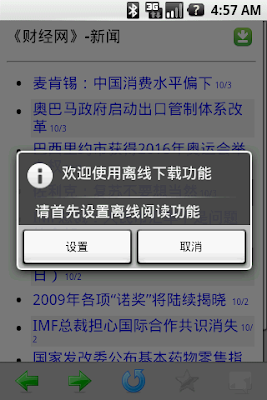
(3) DO NOT enable "Sync with 2G/3G net" unless you have unlimited data plan from your wireless carrier.
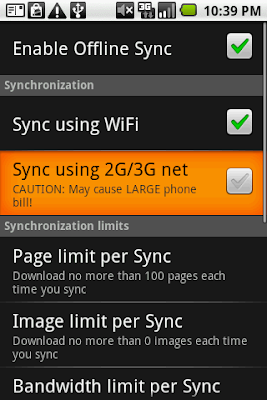
(4) Choose how many pages you'd like to download, and click OK
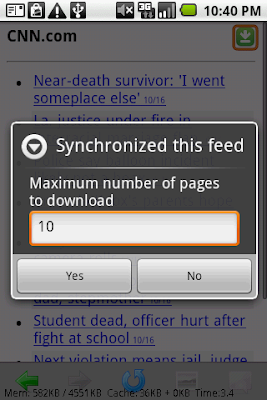
(5) When syncing is complete, the title of the saved feed will show the gray icon
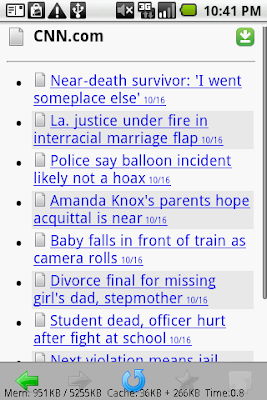
(6) The title of a saved article also shows the gray icon

(B) Reading Saved Articles
(1) From NubiNews home page, choose Offline Reading
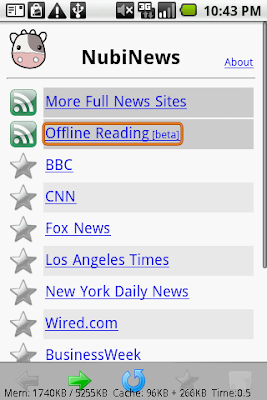
(2) Downloaded news articles are listed by download date
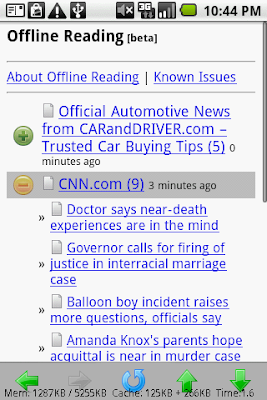
(C) Syncing Multiple Feeds
(1) To sync multiple feeds at the same time, first use NubiNews to browse to the desired feed.

(2) Press your phone's MENU key, and choose Bookmarks
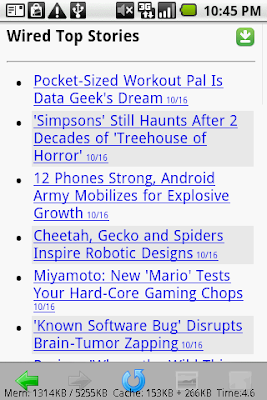
(3) Press the button to add a bookmark for the feed
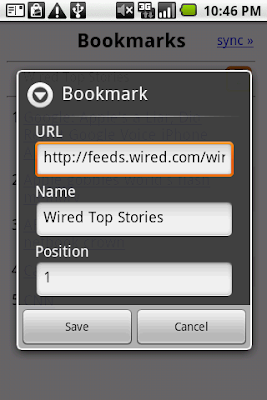
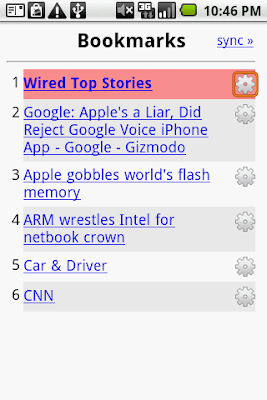
(4) After you have finished adding the bookmarks, choose Sync»
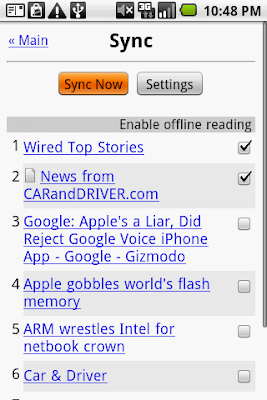
(5) Select the bookmark(s) that you'd like to download, and then choose Sync Now
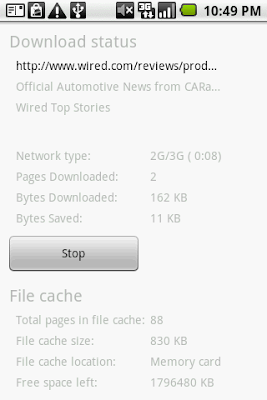
(6) NubiNews starts downloading multiple channels
(D) About Images
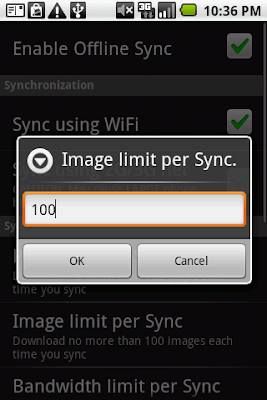
(1) By default, images are not saved during sync operations. If you'd like to save images as well, please press your phone's MENU key, and then choose Settings -> Sync Settings -> Enable Offline Sync -> Image limit per Sync.
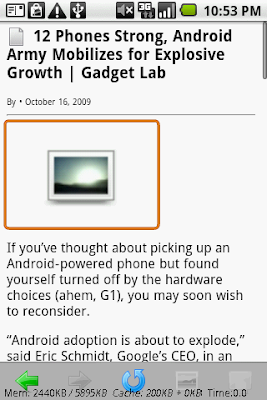
(2) When an article is displayed, if some of its images were not saved in memory card, you will see a default image instead. To view such images, please first make sure your phone have internet access, and then click on the default image.
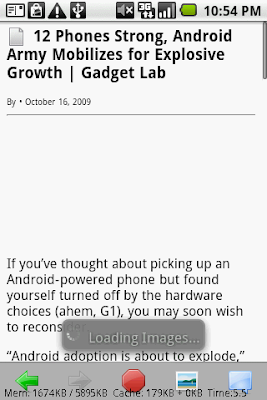
(3) NubiNews will start to load the image
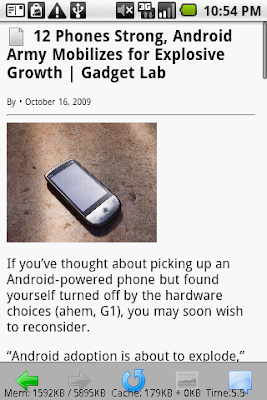
(4) When the image is downloaded, it will be displayed automatically
With Offline Reading, you can save news articles into your phone's memory card. Uses include:
- Read news when you don't have internet access (inside subway or plane)
- Avoid using expensive data networks (e.g., when you're in roaming area)
- Quickly read many articles without downloading them one-by-one
(1) Tap on the download icon next to the feed title

(2) If this is your first time, please configure the offline settings.

(3) DO NOT enable "Sync with 2G/3G net" unless you have unlimited data plan from your wireless carrier.

(4) Choose how many pages you'd like to download, and click OK

(5) When syncing is complete, the title of the saved feed will show the gray icon

(6) The title of a saved article also shows the gray icon

(B) Reading Saved Articles
(1) From NubiNews home page, choose Offline Reading

(2) Downloaded news articles are listed by download date

(C) Syncing Multiple Feeds
(1) To sync multiple feeds at the same time, first use NubiNews to browse to the desired feed.

(2) Press your phone's MENU key, and choose Bookmarks

(3) Press the
button to add a bookmark for the feed
(4) After you have finished adding the bookmarks, choose Sync»

(5) Select the bookmark(s) that you'd like to download, and then choose Sync Now

(6) NubiNews starts downloading multiple channels

(D) About Images
(1) By default, images are not saved during sync operations. If you'd like to save images as well, please press your phone's MENU key, and then choose Settings -> Sync Settings -> Enable Offline Sync -> Image limit per Sync.

(2) When an article is displayed, if some of its images were not saved in memory card, you will see a default image instead. To view such images, please first make sure your phone have internet access, and then click on the default image.

(3) NubiNews will start to load the image

(4) When the image is downloaded, it will be displayed automatically

Thursday, October 8, 2009
离线阅读使用指南
离线阅读简介
大牛新闻的离线阅读功能可以把多篇新闻下载存放于手机的记忆卡里,有以下的用途:
(1) 点击新闻频道右上角的下载图标

(2) 如首次使用,请小心设定离线功能,否则可能使用巨量流量!!!!
(3) 除非你有无限量包月服务,否则千万别激活“用2G/3G网络下载”

(4) 选择下载页数,然后点选“确认”

(5) 下载完毕后,在新闻列表中,已储存的新闻标题旁会出现灰色图标

(6) 已储存的新闻内容,标题旁也会出现灰色图标

(B)阅读已下载的新闻
(1)在大牛新闻首页,点选“离线阅读”

(2)已下载的新闻会以下载时间顺序排列

(C)同时下载多个频道
(1) 如果要同时下载多个频道,请先浏览到您喜欢的频道
(2)按手机上的“MENU”或“菜单”硬键,然后选“书签”

(3) 加好书签后选“Sync»”

(4) 点选需要下载的书签(可选多个),然后按“Sync Now”

(5) 开始下载多个频道

(D) 关于图像
(1) 默认的下载设定并不会存储图像。如果您要存储图像,请按手机上的“MENU”或“菜单”硬键,然后选“设置” -> “离綫设置” -> “图像上限”

(2) 如果新闻中的某些图像没有存储在记忆卡,在阅读已该新闻时,这些图像会显示成默认图像。如要看该图像,请先保证你的手机已经上线,然后点击默认图像

(3) 开始下载图像

(4) 图像下载后自动显示

大牛新闻的离线阅读功能可以把多篇新闻下载存放于手机的记忆卡里,有以下的用途:
- 在没有连线(如在地铁内)的地方阅读新闻
- 避免使用高收费的数据网络(含东亚某国各大移动网络运营商)
- 高速阅读多个新闻,无需逐一下载
(1) 点击新闻频道右上角的下载图标

(2) 如首次使用,请小心设定离线功能,否则可能使用巨量流量!!!!
(3) 除非你有无限量包月服务,否则千万别激活“用2G/3G网络下载”

(4) 选择下载页数,然后点选“确认”

(5) 下载完毕后,在新闻列表中,已储存的新闻标题旁会出现灰色图标

(6) 已储存的新闻内容,标题旁也会出现灰色图标

(B)阅读已下载的新闻
(1)在大牛新闻首页,点选“离线阅读”

(2)已下载的新闻会以下载时间顺序排列

(C)同时下载多个频道
(1) 如果要同时下载多个频道,请先浏览到您喜欢的频道
(2)按手机上的“MENU”或“菜单”硬键,然后选“书签”

(3) 加好书签后选“Sync»”

(4) 点选需要下载的书签(可选多个),然后按“Sync Now”

(5) 开始下载多个频道

(D) 关于图像
(1) 默认的下载设定并不会存储图像。如果您要存储图像,请按手机上的“MENU”或“菜单”硬键,然后选“设置” -> “离綫设置” -> “图像上限”

(2) 如果新闻中的某些图像没有存储在记忆卡,在阅读已该新闻时,这些图像会显示成默认图像。如要看该图像,请先保证你的手机已经上线,然后点击默认图像

(3) 开始下载图像

(4) 图像下载后自动显示

Subscribe to:
Posts (Atom)